
Interface description
Importing the key values
Section titled “Importing the key values”The easiest and fastest way to import key values into maXzie is the interface via REST API. This interface is available both when operating in the cloud and on-premises. On-premises, there is also the option of importing directly from the database.
Import using the REST-API
Section titled “Import using the REST-API”To import performance values, CSV files containing the required values can be uploaded to an HTTP REST endpoint. maXzie provides a URL for each configured performance indicator to which data can be sent via HTTP POST. The URL is composed as follows:
https://<maXzie_url>/api/v1/leistungskennzahlen/<UUID>/importThis URL with inserted UUID can be retrieved in the settings of the performance indicators.
Performance indicator settings
Section titled “Performance indicator settings”Cumulate
Section titled “Cumulate”If the setting “Cumulate” is not activated in the definition of the performance indicator, the already cumulated values must be imported for each period.
If the setting “Cumulate” is activated in the definition of the performance indicator, the non-cumulated values must be imported for each period. maXzie then adds up the values for the individual periods.
Password
Section titled “Password”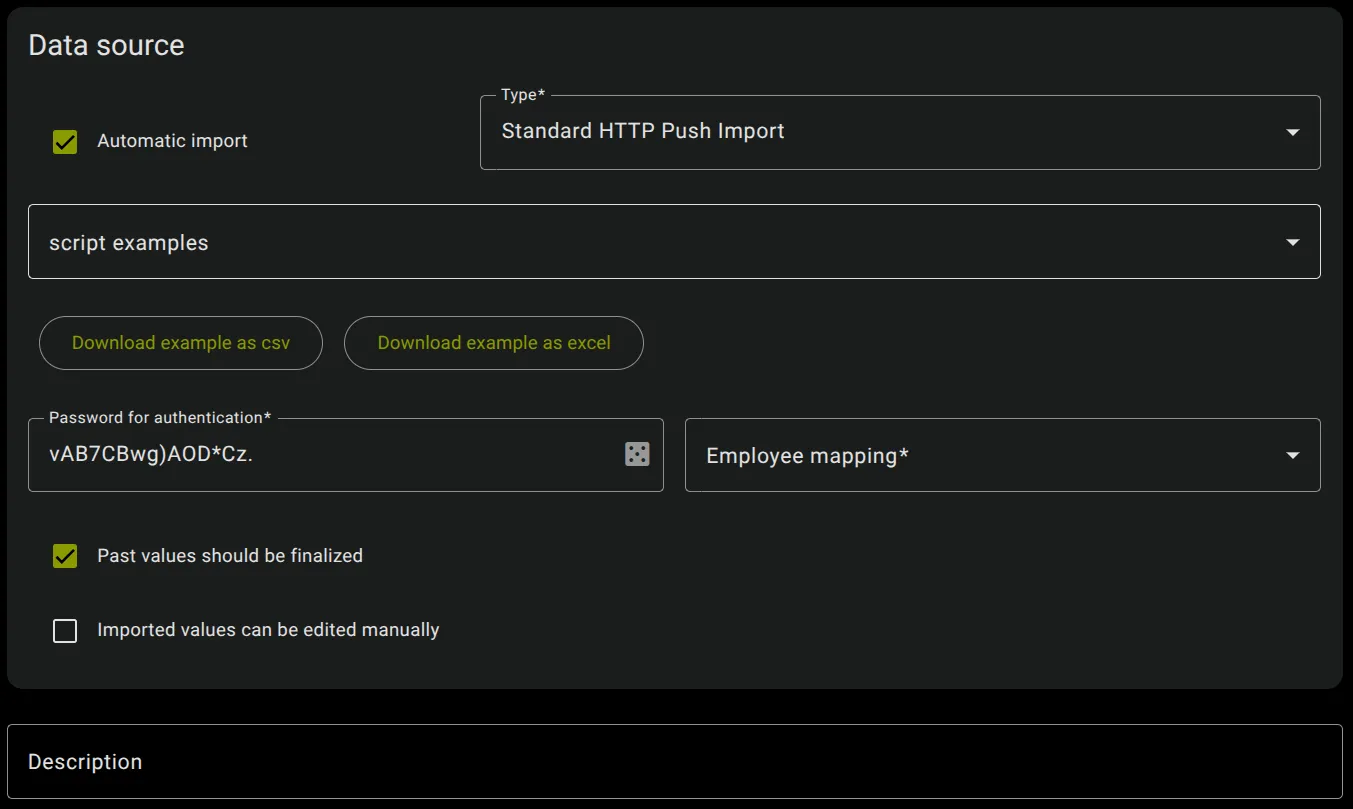
The password to enable imports for each LKZ can be created under the option “Password for Authentication”.
For a successful import of the values via the maXzie API, the passwords configured in maXzie for the respective performance indicators must be passed in a special header.
The header has the following format:
Authorization: LKZ <UUID> <password>Here <UUID> corresponds to the unique identifier and <password> to the password of the corresponding performance
indicator configured in maXzie.
Employee Mapping
Section titled “Employee Mapping”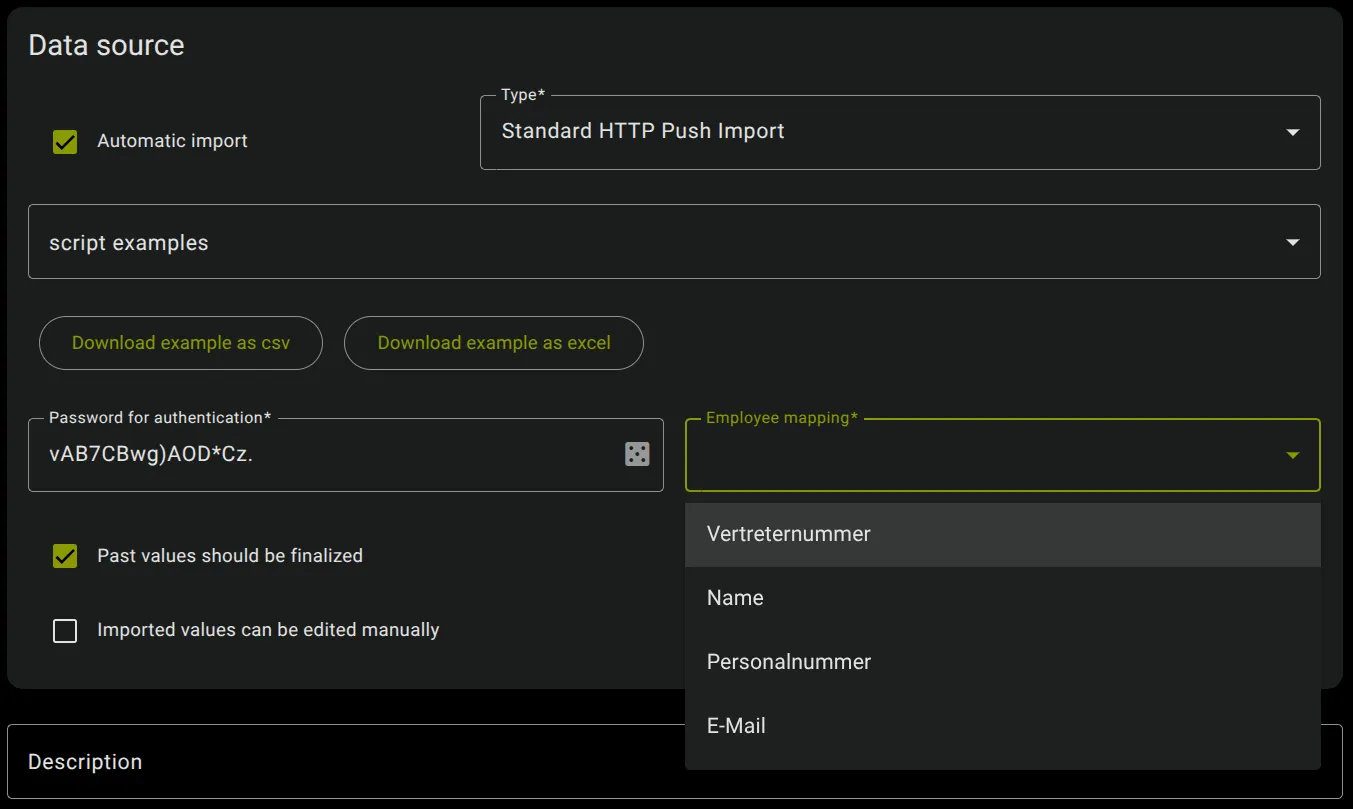
The selected “Employee Mapping” setting is used as the core data import key to map the import values to that employee. The different employee keys are already entered in the Employee core data.
Query-Parameter
Section titled “Query-Parameter”accumulation_timeframe
Section titled “accumulation_timeframe”Empty parameter
Section titled “Empty parameter”The query parameter ‘accumulation_timeframe’ is omitted if individual values per employee and period are transferred and no totals should be formed for the individual time periods.
Without the query parameter ‘accumulation_timeframe’, there may only be one value per employee and per required time period. If, in this case, no line is transferred for a required partial period for an employee, any existing values will not changed.
Set parameter
Section titled “Set parameter”When using the query parameter accumulation_timeframe, the URL is composed as follows:
https://<maXzie_url>/api/v1/leistungskennzahlen/<UUID>/import?accumulation_timeframe=from--toHere from and to are given in ISO-8601 format (YYYY-MM-DD), for example ‘2020-01-01’.
The query parameter accumulation_timeframe restricts the import to the specified total period. Totals are also formed
for partial periods that are only partially within the total period passed by the query parameter (see also
example scenario 6). If the parameter
accumulation_timeframe is set and no row is transferred for a required partial period for an employee or group, this
results in a total of 0 for the employee and period.
skipRows
Section titled “skipRows”To skip rows at the beginning of the transmitted file, the query parameter skipRows can be used with the number of
rows to be skipped. For example, if there is a header row with headings, skipRows=1 can be used. If the parameter is
omitted, no rows are skipped.
CSV files
Section titled “CSV files”CSV files must use UTF-8 character encoding without signature/BOM. Semicolons (“;”) are expected as column separators
and dots (“.”) as decimal separators. Thousands separators are not used. Dates are transmitted in ISO-8601 format
(YYYY-MM-DD), for example “2020-04-01”.
Global/Companywide performance indicators
Section titled “Global/Companywide performance indicators”For performance indicators without assignment of values to individual employees or groups the following columns are expected:
| Column | Title | Example |
|---|---|---|
| 1 | Date | 2020-01-28 |
| 2 | Value | 12345.67 |
Each value is assigned to the period that contains the date specified in column 1. Each date within this period can be used equally without distinction.
An example CSV file would look like this:
2020-01-31;47.02152020-02-28;4198.422020-03-31;0.00123Performance indicators with group assignment
Section titled “Performance indicators with group assignment”For performance indicators with assignment of values to groups, the following columns are expected:
| Column | Title | Example |
|---|---|---|
| 1 | Date | 2020-01-28 |
| 2 | Group import key | group_sales |
| 3 | Value | 12345.67 |
Group import keys are entered in the ‘Groups’ core data. A value is assigned to the group whose core data group import key corresponds to the group import key transferred in the line.
An example CSV file would look like this:
2020-01-31;group_sales;47.02152020-02-28;group_office_service;4198.422020-03-31;group_field_service;0.00123Performance indicators with employee assignment
Section titled “Performance indicators with employee assignment”For performance indicators with assignment of values to employees, the following columns are expected:
| Column | Title | Example |
|---|---|---|
| 1 | Date | 2020-01-28 |
| 2 | Employee key | P101 |
| 3 | Value | 12345.67 |
Employee keys are entered in the ‘Employees’ core data. A value is assigned to the employee whose core data employee key corresponds to the employee key transferred in the line.
An example CSV file would look like this:
2020-01-31;P2000284;47.02152020-02-28;P2487684;4198.422020-03-31;P0000001;0.00123Example scripts
Section titled “Example scripts”Importing performance values via the maXzie API can be done as follows:
-
Import with curl on Linux (Terminal)
Terminal window URL="https://<maXzie_url>/api/v1/leistungskennzahlen/<uuid>/import"HEADER="Authorization: LKZ <uuid> <password>"curl -k -X POST -H "Content-Type: text/csv" -H "$HEADER" --data-binary "@<import_file>" "$URL"maXzie also gives an example script with filled in
<UUID>and<password>directly in Performance Indicator Setting. The<UUID>and<password>is not filled in if the performance indicator is not atleast saved once.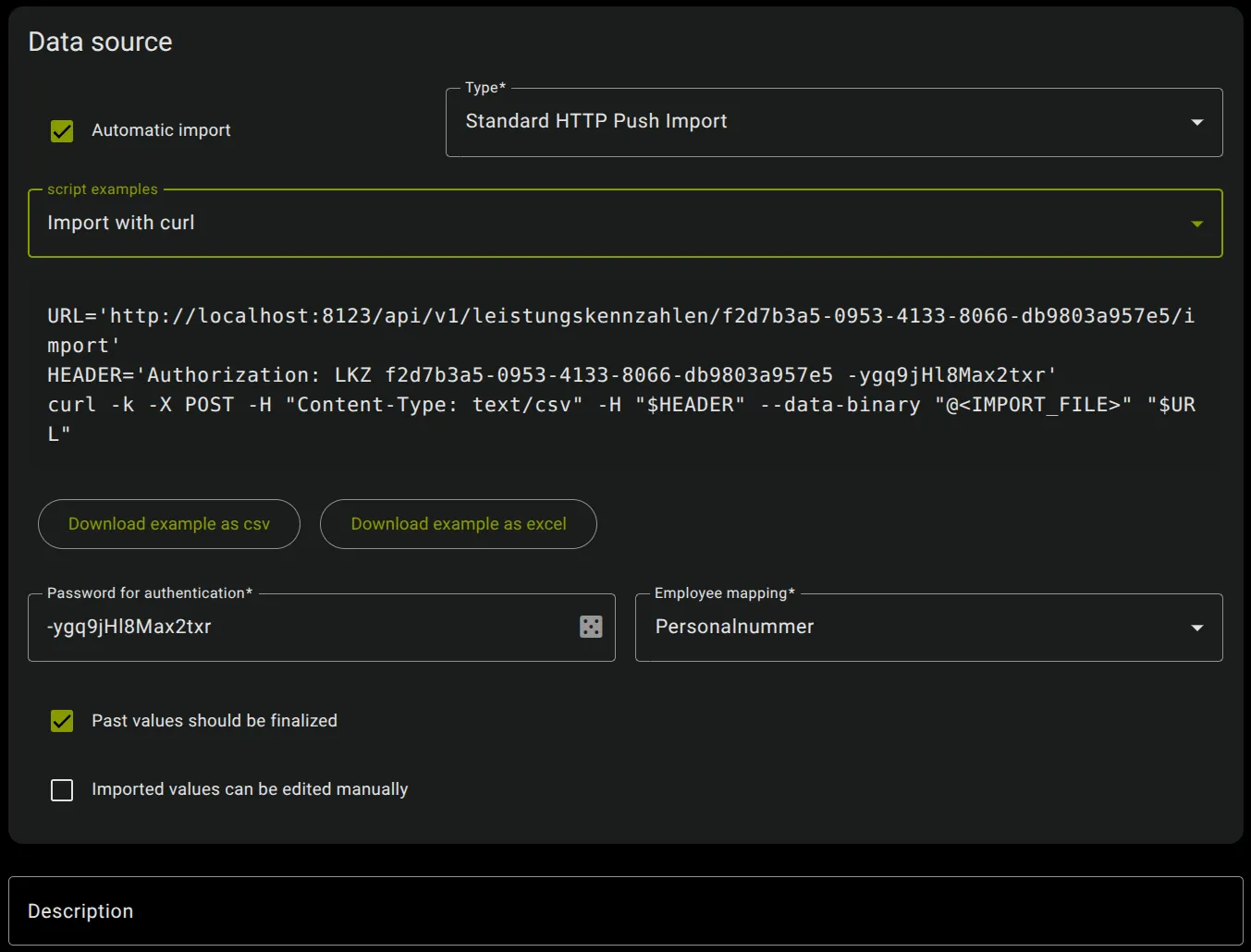
-
Import on Windows (Powershell)
Terminal window [System.Net.ServicePointManager]::ServerCertificateValidationCallback = {$true}$AllProtocols = [System.Net.SecurityProtocolType]'Tls12'[System.Net.ServicePointManager]::SecurityProtocol = $AllProtocols$url='https://<maXzie_url>/api/v1/leistungskennzahlen/<uuid>/import'$header=@{'Authorization'='LKZ <uuid> <password>'}$ep=Get-ExecutionPolicySet-ExecutionPolicy -ExecutionPolicy Unrestricted -Scope CurrentUserInvoke-WebRequest -Uri $url -Headers $header -ContentType 'text/csv' -Method POST -InFile <import_file>Set-ExecutionPolicy -ExecutionPolicy $ep -Scope CurrentUser
If values are imported for time periods that are already filled with values, previous values for this time period and, if applicable, for this employee or group will be overwritten.
Example scenarios
Section titled “Example scenarios”Scenario 1: “Cumulate” not set, “accumulation_timeframe” not set
Section titled “Scenario 1: “Cumulate” not set, “accumulation_timeframe” not set”- Performance Indicator Settings:
- Cumulate: not set
- Reporting timeframe: monthly, starting at 01.01.2020
- Required parameter: None (global performance indicator)
- Query-Parameter:
- accumulation_timeframe: not set
CSV-File:
2020-01-31;102020-02-28;152020-03-31;25The resulting values in maXzie from this import are:
| Timeframe | Value |
|---|---|
| January 2020 | 10 |
| February 2020 | 15 |
| March 2020 | 25 |
Since “Cumulate” is not set for the performance indicator, the values are taken over individually for each month and are not cumulated. That means, the value 25 for the Timeframe “March 2020” reflects only the value for March.
Since accumulation_timeframe is not set, there may be at most one value for each month, as there is no accumulation
within months.
Scenario 2: “Cumulate” set, accumulation_timeframe not set
Section titled “Scenario 2: “Cumulate” set, accumulation_timeframe not set”- Performance Indicator Settings:
- Cumulate: set
- Reporting timeframe: monthly, starting at 01.01.2020
- Required parameter: None (global performance indicator)
- Query-Parameter:
- accumulation_timeframe: not set
CSV-File:
2020-01-31;102020-02-28;152020-03-31;25The resulting values in maXzie from this import are:
| Timeframe | Value |
|---|---|
| January 2020 | 10 |
| February 2020 | 25 |
| March 2020 | 50 |
Since “Cumulate” is set for the performance indicator, the values are cumulated from month to month by maXzie. That means the value 50 for the Timeframe “March 2020” includes all the previous Timeframes (January + February + March).
Since accumulation_timeframe is not set, there may be at most one value for each month, as there is no accumulation
within months.
Scenario 3: “Cumulate” not set, accumulation_timeframe set
Section titled “Scenario 3: “Cumulate” not set, accumulation_timeframe set”- Performance Indicator Settings:
- Cumulate: not set
- Reporting timeframe: monthly, starting at 01.01.2020
- Required parameter: None (global performance indicator)
- Query-Parameter:
- accumulation_timeframe: set as
- from: 2020-01-01
- to: 2020-03-31
- accumulation_timeframe: set as
This configuration is currently not supported.
Scenario 4: “Cumulate” set, accumulation_timeframe set
Section titled “Scenario 4: “Cumulate” set, accumulation_timeframe set”- Performance Indicator Settings:
- Cumulate: set
- Reporting timeframe: monthly, starting at 01.01.2020
- Required parameter: None (global performance indicator)
- Query-Parameter:
- accumulation_timeframe: set as
- from: 2020-01-01
- to: 2020-03-31
- accumulation_timeframe: set as
CSV-File:
2020-01-15;32020-01-20;72020-02-10;112020-02-23;42020-03-31;25The resulting values in maXzie from this import are:
| Timeframe | Value |
|---|---|
| January 2020 | 10 |
| February 2020 | 25 |
| March 2020 | 50 |
Since “Cumulate” is set for the performance indicator, the values are cumulated from month to month by maXzie. That means the value 50 for the Timeframe “March 2020” includes all the previous Timeframes (January + February + March).
Since accumulation_timeframe is set, the values are added up within the individual months.
Scenario 5: “Cumulate” set, accumulation_timeframe set, Performance indicator with employee assignment
Section titled “Scenario 5: “Cumulate” set, accumulation_timeframe set, Performance indicator with employee assignment”- Performance Indicator Settings:
- Cumulate: set
- Reporting timeframe: monthly, starting at 01.01.2020
- Required parameter: Employee Key (Employee Mapping Setting)
- Query-Parameter:
- accumulation_timeframe: set as
- from: 2020-01-01
- to: 2020-03-31
- accumulation_timeframe: set as
CSV-File:
2020-01-15;P101;32020-01-20;P101;72020-02-10;P101;112020-02-23;P101;42020-03-31;P101;252020-01-11;P102;32020-01-25;P102;22020-02-04;P102;62020-02-21;P102;4The resulting values in maXzie from this import are:
- for employee “P101”
| Timeframe | Value |
|---|---|
| January 2020 | 10 |
| February 2020 | 25 |
| March 2020 | 50 |
- for employee “P102”
| Timeframe | Value |
|---|---|
| January 2020 | 5 |
| February 2020 | 15 |
| March 2020 | - |
Since “Cumulate” is set for the performance indicator, the values are cumulated from month to month by maXzie. That means the value 50 for the employee “P101” for the Timeframe “March 2020” includes all the previous Timeframes (January + February + March).
Since accumulation_timeframe is set, the values are added up within the individual months.
The order of the rows in the CSV file is arbitrary. Since the values for the employee “P102” are missing for March, no values are imported here and the value in maXzie is set empty. If the first values are imported in April and the item “Past values should be completed” is activated for the performance indicator, a zero is set as the value for March.
Scenario 6: “Cumulate” set, accumulation_timeframe set, Reporting timeframe weekly
Section titled “Scenario 6: “Cumulate” set, accumulation_timeframe set, Reporting timeframe weekly”- Performance Indicator Settings:
- Cumulate: set
- Reporting timeframe: weekly, starting at 06.01.2020 (Monday)
- Required parameter: None (global performance indicator)
- Query-Parameter:
- accumulation_timeframe: set as
- from: 2020-01-01
- to: 2020-02-29
- accumulation_timeframe: set as
CSV-File:
2020-01-15;32020-01-17;32020-01-21;42020-02-10;52020-02-13;62020-02-23;32020-02-28;1The resulting values in maXzie from this import are:
| Timeframe | Value |
|---|---|
| CW1 2020 (06.01.2020-12.01.) | 0 |
| CW2 2020 (13.01.2020-19.01.) | 6 |
| CW3 2020 (20.01.2020-26.01.) | 10 |
| CW4 2020 (27.01.2020-02.02.) | 10 |
| CW5 2020 (03.02.2020-09.02.) | 10 |
| CW6 2020 (10.02.2020-16.02.) | 21 |
| CW7 2020 (17.02.2020-23.02.) | 24 |
| CW8 2020 (24.02.2020-01.03.) | 25 |
Since “Cumulate” is set for the performance indicator, the values are cumulated from week to week by maXzie.
Since accumulation_timeframe is set, the values are added up within the individual weeks (e.g. values from 2020-01-15
and 2020-01-17 are added up for the value of week 2).
Since week 8 (24.02.-01.03) is partly in the ‘accumulation_timeframe’ (01.01.2020-29.02.2020), values are also imported for this period.
Example Python script for import from Postgres database
Section titled “Example Python script for import from Postgres database”#!/usr/bin/python3
import psycopg2import datetimefrom psycopg2.extensions import AsIsfrom requests.auth import HTTPBasicAuthimport csvimport requests
host = "{Host}"user = "{Benutzer}"database = "{databsename}"password = "{password}"url = "https://customer.maxzie.de/api/v1/leistungskennzahlen/{Leistungskennzahl-ID}/import"token = "{token}"currentDate = datetime.datetime(2021, 1, 17)
def get_CsvFromPostgresDatabase(): connection = None try: connection = psycopg2.connect( database=database, user=user, host=host, password=password) connection.set_session( isolation_level=psycopg2.extensions.ISOLATION_LEVEL_SERIALIZABLE) cursor = connection.cursor() sql_select = """SELECT personal_number, order_date, SUM(revenue) FROM Order_Intake WHERE EXTRACT(YEAR FROM order_date) = %(year)s AND EXTRACT(MONTH FROM order_date) = %(month)s GROUP BY personal_number, order_date""" cursor.execute( sql_select, {"year": currentDate.year, "month": currentDate.month}) csvLines = [] if cursor.rowcount > 0: rows = cursor.fetchall() for row in rows: line = row[1].strftime("%Y-%m-%d") + ";" + row[0] + ";" + str(row[2]) csvLines.append(line) finally: if connection is not None: connection.close()
return csvLines
def main(): csvLines = get_CsvAusPostgresDatenbank() response = requests.post( url=url, data="\r\n".join(csvLines), headers={"Authorization": "LKZ {Leistungskennzahl-ID} " + token}) print(response) print(response.text)
if __name__ == '__main__': main()Import from Microsoft SQL Server or PostgreSQL
Section titled “Import from Microsoft SQL Server or PostgreSQL”The import of performance values is realised via SQL queries, which are executed by maXzie in the customer’s database at regular intervals and read out the values required by maXzie there.
Queries and the times at which the queries are to be executed by maXzie are configured in the web interface for each performance indicator individually in its settings page. To do this, the automatic import must first be activated and the import from “Microsoft SQL Server” or “PostgreSQL” selected. The input fields “Trigger”, “URL”, “User”, “Password” and “Query” are then available.
Configuration fields “URL”, “User” and “Password”
Section titled “Configuration fields “URL”, “User” and “Password””The information of the configuration fields “URL”, “User” and “Password” enable maXzie to access a specific database of the client. Example specifications for “URL” are:
- For SQL Server:
jdbc:sqlserver://10.1.0.2:1433;DatabaseName=customerdata - For PostgreSQL:
jdbc:postgresql://10.1.0.2:5432/customerdata
If necessary, further parameters are useful, e.g. for encryption of the data transmission. Further information can be found in the documentation of the database system.
Configuration field “Trigger”
Section titled “Configuration field “Trigger””The configuration field “Trigger” determines times and frequency of the database query. Cron expressions are used here. Example values are:
- Import every night at 5 a.m.:
* * 5 * * * - Import every Sunday at 6 a.m.:
* * 6 * * 7 - Import at every full hour:
0 0 * * * *
For more information and examples, see https://docs.spring.io/spring-framework/docs/current/javadoc-api/org/springframework/scheduling/support/CronExpression.html#parse-java.lang.String-
Configuration field “Query”
Section titled “Configuration field “Query””In the configuration field “Query”, an SQL-SELECT query must be stored, which is executed in the specified database of the customer. This query has the task of reading out the values required by maXzie. The periods for which values are needed are contained in a temporary table created by maXzie. The query must link the other tables in the database to this temporary table to produce the required values as a result.
This temporary table with the time periods of the required values is created before the execution of the specified query and only exists within the transaction in which the specified query is executed. The name of the temporary table is set by maXzie, the placeholder #neededValues is replaced by the name of the temporary table at the time of the query. The structure of this table is as follows (created automatically by maXzie):
CREATE TABLE #neededValues ( leistungskennzahlwert_id CHAR(36) NOT NULL, subjectId VARCHAR(255), fromYear INTEGER NOT NULL, fromMonth INTEGER NOT NULL, fromDay INTEGER NOT NULL, toYear INTEGER NOT NULL, toMonth INTEGER NOT NULL, toDay INTEGER NOT NULL);subjectId here identifies an employee or group if the required values are referring to an employee or group. The
necessary fields must be configured by the {ni} during setup and are then available in the core data forms. When
configuring the import in the performance indicators, the desired core data field can then be selected under “Employee
mapping”.
fromYear, fromMonth, fromDay, toYear, toMonth, toDay refer to the time interval for which a value is to be
determined by the query. Both designated days are still part of the time interval; a whole month is then expressed by
the values (2015, 1, 1, 2015, 1, 31), for example.
The result of the query must contain two columns. The first column contains the value of performance_id from the
temporary table described above. The second column contains a numerical value with the determined value (integer, fixed
point or floating point number).
For example, a query for PostgreSQL might look like the following and could be entered into the “Query” configuration field like this:
SELECT nv.leistungskennzahlwert_id, ( SELECT COALESCE(SUM(sub.amount), 0) FROM (SELECT o.amount, make_date(o.year, o.month, o.day) AS date FROM Orders o) sub WHERE sub.date BETWEEN make_date(nv.fromYear, nv.fromMonth, nv.fromDay) AND make_date(nv.toYear, nv.toMonth, nv.toDay))FROM #neededValues nv;For example, a query for Microsoft SQL Server might look like the following and could be entered into the “Query” configuration field like this:
SELECT nv.leistungskennzahlwert_id, ( SELECT COALESCE(SUM(sub.amount), 0) FROM (SELECT o.amount, DATEFROMPARTS(o.year, o.month, o.day) AS date FROM Orders o) sub WHERE sub.date BETWEEN DATEFROMPARTS(nv.fromYear, nv.fromMonth, nv.fromDay) AND DATEFROMPARTS(nv.toYear, nv.toMonth, nv.toDay))FROM #neededValues nv;Exporting the payment data
Section titled “Exporting the payment data”The export of the payment data calculated by maXzie a csv- or excel-file can be downloaded in the web interface. The standard export file has the following format:
| Last name | First name | Balance before payment | Recommended payment | Payment | Currency | Date |
|---|---|---|---|---|---|---|
| Zie | Max | 1000,00 | 800,00 | 800,00 | EUR | 2024-01-01 |
The format of the file can be customized by the maXzie support.